General Q&A
MCube is the „Munich Cluster for the Future of Mobility in Metropolitan Regions.“ As a transfer and application cluster, we develop scalable solutions for the mobility of the future together with over 80 partners from science, business, administration, and civil society. The cluster is led by the Technical University of Munich (TUM) and is funded by the Federal Ministry of Research, Technology and Space (BMFTR). The focus is on key mobility topics such as autonomous driving, electromobility, smart infrastructures, legal frameworks, and the livable redesign of public spaces.
MobiPionier is part of “MCube” - the “Munich Cluster for the Future of Mobility in Metropolitan Regions.” It is one of nine projects in the second phase of the MCube research cluster. MobiPionier stands for „Mobility Budgets and Bundles in the Munich Metropolitan Region as an Alternative to Regulation.“ MobiPionier focuses on the idea that a person is not reliant on a single mode of transport but can flexibly use different modes of transport for various travel purposes.
Various means of transport, such as buses, trains, and e-scooters, are combined into a package for a fixed price.
A fixed sum of money that can be flexibly used for various means of transport as desired. During the MobiPionier test phase, the mobility budget can be conveniently managed and used via an app, such as the MVG Mobility Budget App.
A use case (often called „Anwendungsfall“ in German) describes a very specific real-life situation in which an idea, technology, or research result can actually be used and tested.
The project is testing mobility budgets and mobility bundles for various everyday situations. For example, people have different needs for commuting to work than for a weekend excursion. Therefore, we are examining two scenarios in the use cases:
A real-world laboratory (often called a Living Lab or Real-World Lab in English) is a research and experimentation space in the real world. In it, new ideas, technologies, or social solutions are tested with individuals from science, politics, business, and the general public under real conditions. We also call the MobiPionier real-world laboratory the „test phase“.
You will gain access to new, flexible mobility options that will make your everyday life more convenient and sustainable. And by participating, you will help us develop tailor-made offers for the Munich metropolitan region.
The project is open to anyone who is curious about new forms of mobility and wants to help shape the future. This includes commuters, students, families, and senior citizens. You can find out about the latest news on this website.
No! It is not about prohibitions, but about providing new alternatives. You decide for yourself when to switch to buses, trains, bicycles, or shared mobility services. MobiPionier offers more freedom and less dependence on your car, without any coercion.
The protection of participants' personal data is our highest priority. All collected data will be anonymized and used exclusively for research purposes. The data protection agreements will be strictly adhered to.
FAQ Data Protection and Data Usage
Data on the use of the mobility budget or mobility bundle
Mobility Budgets
Mobility Bundles:
No complete receipts, invoices, or tickets containing detailed travel information such as origin and destination addresses, specific route or purpose of travel are processed.
Data from the TUM Tracking App
Your mobility data is collected via the TUM Mobility App, developed by MOTIONTAG specifically for the Technical University of Munich. Your data is stored on servers physically located within the European Union. Initially, it will be processed and pseudonymized at the responsible Chair of Automotive Technology. For evaluation and research purposes, the data - in pseudonymized and further anonymized form - will be shared with other participating scientific institutions. Transfer to third parties outside the project is excluded. After further anonymization, the data can also be used long-term for scientific publications or stored in research databases.
The protection of participants' personal data is our top priority. All data collected will be anonymized and used exclusively for research purposes. Data protection regulations will be strictly adhered to. It is not possible to draw conclusions about individuals.
Access to your data is primarily the responsibility of the Chair of Automotive Engineering, which is responsible for data processing. External partners (MVGO, MVG-Mobility Budget App, MotionTag, Shared Mobility Provider App, uRyde) are involved for the registration and use of the apps, and they process your email address. Further scientific institutions, namely the Professorship for Mobility Policy and the Chair of Settlement Structure and Transport Planning, receive exclusively pseudonymized and, as far as possible, anonymized data. The data is stored on servers within the EU, and disclosure to third parties outside of this project is excluded.
Your data will initially be collected and processed for the duration of the study. Three months after data collection ends, the link between your email address and the pseudonymous identifier (UUID) will be deleted, marking a first step towards anonymization. No later than one year after the project ends, all remaining pseudonymized datasets will be either completely anonymized or deleted if anonymization is not possible. The subsequently anonymized data can be stored and used indefinitely for scientific purposes. However, it should be noted that after the deletion of the link between email and UUID, no further association with your person will be possible.
Yes, you have the right to withdraw your consent at any time and request the deletion of your data. This can be done without giving any reason. Alternatively, you can agree to your data being used anonymously after withdrawal. However, the following applies: once the link between your email address and the UUID has been deleted – approximately three months after the end of the study – it will no longer be possible to delete your data specifically, as it can then no longer be assigned to you.
Yes, you can request your data. According to Art. 15 GDPR, you have the right to obtain information about the data concerning you, also in the form of a free copy. This means you can ask at any time what data has been stored about you and request a copy of this data. Furthermore, you also have the right to request rectification, restriction of processing, or transfer of your data. If you have questions about data processing or data storage, please contact: tracking@mcube-cluster.com.
The app records everywhere you go with your smartphone. This is not necessarily limited to your city. A holistic view of your travel behavior can reveal which modes of transport you prefer and how active you are when you're out and about.
Once the consent form is confirmed, the app is installed, and GPS usage is activated, data points will be collected. When participating in the survey, user data will be stored and sensor data will be recorded, providing information about spatial coordinates, timestamps, and movement states. Stages with various modes of transport and associated attributes such as duration and length will be calculated from these data points. Therefore, using the app over a longer period will map out multi-day movement profiles.
We take the protection of your data very seriously and treat it confidentially. All information collected by us is subject to the General Data Protection Regulation (EU GDPR). And to be absolutely sure, external data protection officers provide us with advice and support.
Pseudonymized
Recorded sensor data and derived movement data are kept separate from your identification features (user data) and are assigned to a user via a pseudonym (UUID). Your movement patterns are therefore collected pseudonymously. However, by observing recurring locations, conclusions can be drawn, such as about your place of residence and work. Therefore, we treat all data very sensitively. For long-term data storage, we only use further anonymized data, which is ensured by generalizing the tracks.
ISO-certified
After recording in the app, the captured data is transferred to an ISO-certified data center located in Germany and stored there in a database. The ISO certification describes the highest international certification standard for information management systems.
Encrypted
The transmission of data collected by the app takes place exclusively via cryptographically secured encryption methods.
Opt-out
Participants in the survey have the option at any time to request the blocking or deletion of their individual movement data. Data deletion can be requested via email. The email should have the subject line „Please delete movement data“ and be sent to tracking@mcube-cluster.com to be sent. The email address used to register in the app should be used, or this email address must be provided in the email. All data will then be removed from the live system and will not be included in further evaluations. The data deletion is irreversible and will be carried out on all data carriers, including backup storage. For technical reasons, however, deletion on the backup storage will be delayed. All data stored in the app will be deleted when the app is uninstalled.
As an app user, you enjoy the rights of withdrawal and objection as set out in the GDPR. Pursuant to Art. 8 para. 3 and Art. 21 of the GDPR, you may object to the use and recording of your data at any time and revoke any consent previously given for the use of your data. To exercise the aforementioned rights, please contact tracking@mcube-cluster.com.
Please note that by such a contradiction, you may have violated the terms and conditions and are therefore excluded from participating in the project.
For information requests, please send an email with the subject „Information Request“ to [email protected], stating the email address you used to register. tracking@mcube-cluster.com.
Technical Requirements
Android
To use the app, you need Android 6.0 or higher.
iPhone:
The app supports iPhones from model 6s onwards with iOS version 13.4 or higher. You can find your iPhone model and iOS version in your iPhone's Settings/General/About. You can check if your iOS is up to date under Settings/General/Software Update.
Android
iPhone:
Don't worry, we're not accessing heart rates, activity levels, or past diet successes, but we do need permission to access your iPhone's CMMotionActivity data, which informs us about your current state of motion. Since the iPhone 5s, Apple collects CMMotionActivity data in the background by analyzing various smartphone sensors, providing insights into whether you are walking, running, traveling in a vehicle, or stationary. This helps us control the app's sleep/wake automation, and you benefit from low battery consumption and more accurate results.
Android
On Android, you can access location services directly from the app. Simply tap „GPS is off.“ You will be taken directly to the system settings. Please confirm „Access my location“ there, as well as „GPS satellites“ and „Wireless networks“ in the location sources.
iPhone
For the iPhone, open „Settings“ > „Privacy“ > „Location Services.“ Location Services must be generally enabled, and the TUM Mobility App must be allowed to access location services at all times.
Yes. You have the option to disable recording in the app settings. If you disable location services in your smartphone's settings, or revoke access to location services, tracking will also be turned off. If you turn location services back on later and want to use the app again, you will need to manually re-enable tracking in the app.
Using location services—especially GPS—drains battery power. However, the app is configured to be very battery-efficient, keeping battery consumption to a minimum. It does this by utilizing other smartphone sensors and smart algorithms in addition to GPS, which, for example, minimize the frequency of location queries and thus conserve battery life. We work every day to further reduce battery consumption. While the app is in motion and actively tracking, it consumes approximately 3% of battery per hour on our test devices. We estimate that the app does not actively track for more than 4 hours per day under normal use. However, since this varies from device to device, we recommend charging your phone overnight.
The app sends collected data and travel distances to our servers for analysis, usually via Wi-Fi, as soon as the phone connects to a Wi-Fi network. Therefore, the impact on your data usage is minimal (approx. 2 KB/day). If you do not have regular Wi-Fi access, you can also activate data transmission via mobile data in the app settings. With typical usage and activated mobile data transmission, approximately 2.5 MB per day will be consumed.
TUM Mobility App Handling
Once you have registered once in the app, it is sufficient to simply run our app in the background. To improve the accuracy of the survey, please regularly check the automatically detected modes of transport and confirm or correct them.
Yes. In the app, you can see your tracks for each day and get an overview of when and by what means of transport you traveled where.
Additionally, there is a statistics section in the app. There, you can track your travel activity on a specific day, week, or month. This provides you with a summary overview of your mobility behavior during the respective period.
You have the option to manually correct or confirm recorded travel paths, modes of transport, and activities, thereby helping the system to optimize the results.
To see and confirm your recorded tracks, go to the calendar view in the app. Days on which data was recorded but not yet validated are marked with a colored dot. Once you have validated your tracks for a specific day, that colored dot will turn gray.
To access an entry, click on a date with a colored dot. In the upper part of the screen, you will see a map showing your routes, and in the lower part, a list of individual stages. Scroll through this list to view all recorded stages. If the suggested mode of transport or purpose of stay is incorrect, click on the list entry to edit it.
Track Confirmation
All stages or days marked with a red dot have not yet been fully validated. Each stage that you have clicked on or edited individually will automatically be considered validated and the red dot will disappear. If you do not want to make any changes to an entire day, you can also confirm the entire day at once by clicking on the red checkmark.
Changing already validated stages
You can then review your routes and stays again at any time and make changes, which will be automatically applied.
The app was created by the German company MotionTag based in Potsdam.
The corresponding explanation videos in English and German for IOS and Android can be found at the bottom of the page.
Yes. If the app does not correctly recognize the purpose of a trip, you can manually adjust it and select the appropriate category. An overview of all available categories can be found here: Overview of Trip Categories.
Troubleshooting
At the beginning, you will receive a registration code from us. This is only valid for one registration. If you have already created your account and try to register again with the same code, an error message will appear.
In any case: Please activate your account. As part of the registration, please confirm your email address to activate your account. You should have received an email with a confirmation link. Please check your inbox as well as your spam folder if necessary. Click on the link to activate your account. You can then log in with your email address and the password you chose and start using the app. If you are unsure which password you chose, you can choose a new password using the “Reset Password” button.
Please be patient. By default, the app only transmits data over Wi-Fi to minimize your mobile data usage. Once a stable connection to a Wi-Fi network is established, data processing can take several hours, which is why you may see your tracked routes reflected in the app with a delay. If you rarely have Wi-Fi access, you can enable data transmission over mobile data in the app's settings.
To correctly record travel routes, the app requires access to your GPS data. Updates to the Android system can sometimes prevent this on certain devices. To resolve a GPS issue, please check the following steps:
Location access
Ensure the app has permission to access your location. Settings > Apps > TUM Mobility > Permissions > Location Access ON (Allow all the time)
Battery performance optimization
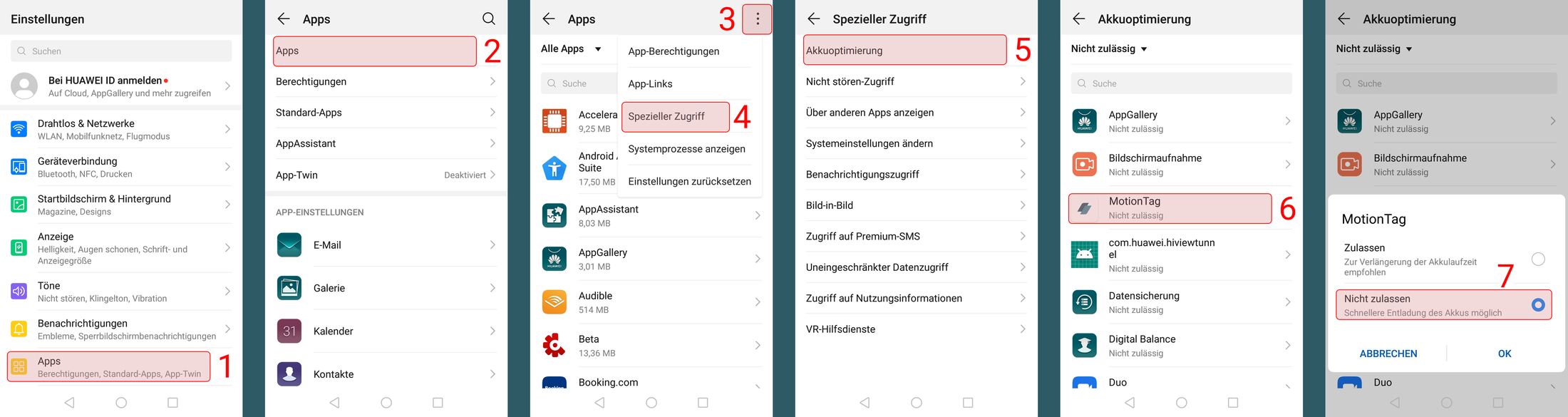
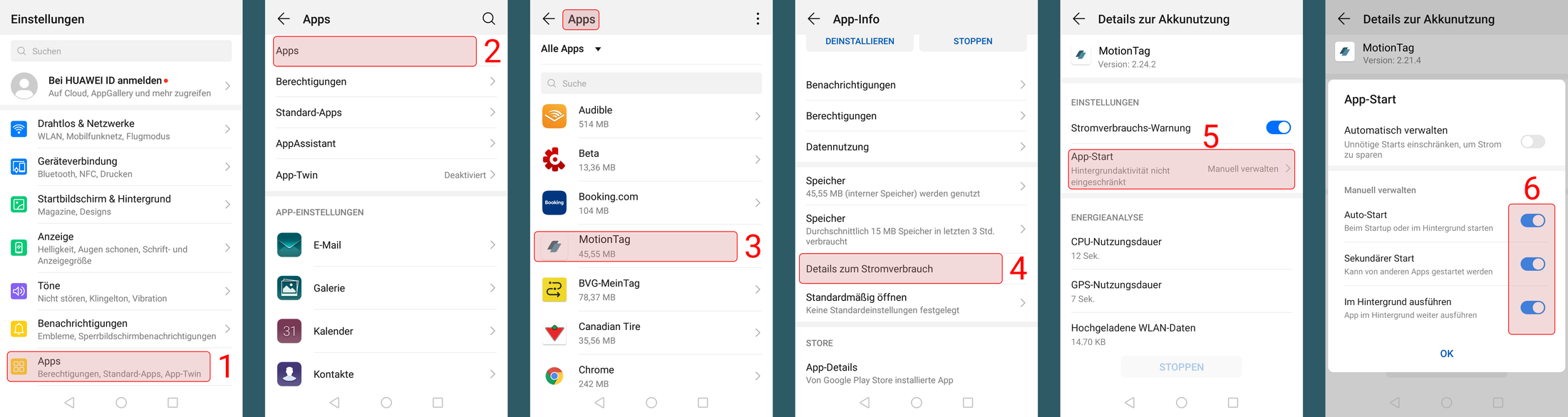
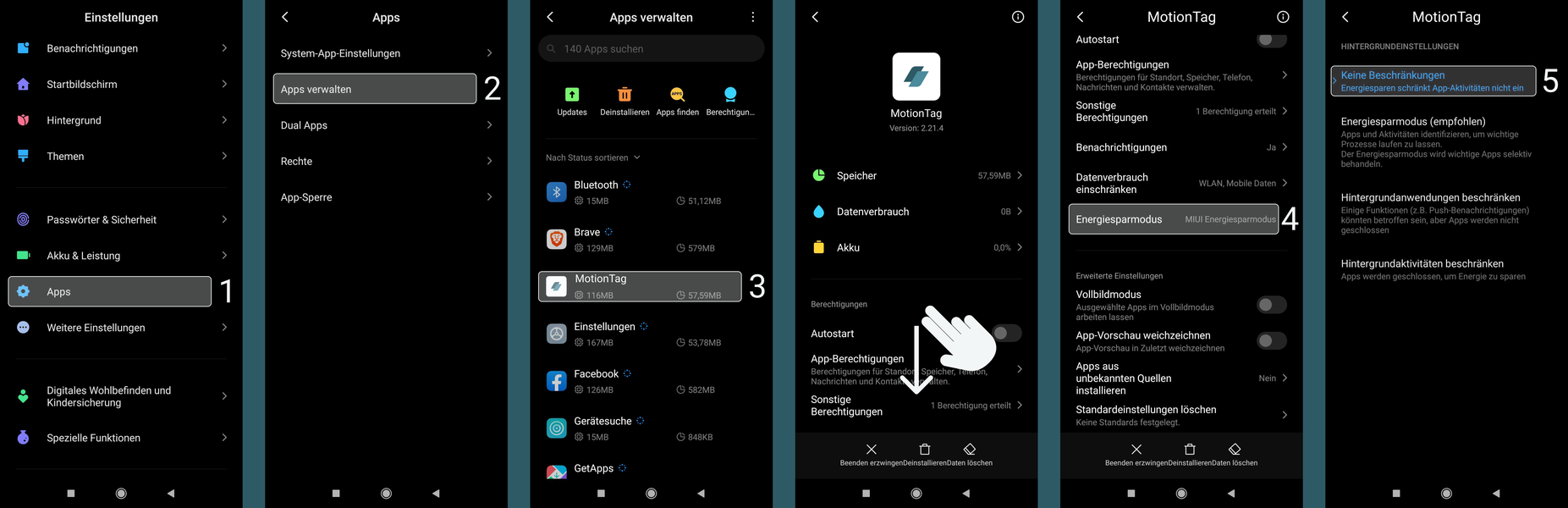
For the app to function correctly and track routes in the background, battery optimization for the app must be disabled in your smartphone's settings. On some smartphone models, particularly those from Huawei, Samsung, OnePlus, and Xiaomi, there are manufacturer-customized, app-specific battery saving modes. These are automatically activated when the device is not used for a certain period. As a result, the device's operating system does not allow apps running in the background and terminates them in standby mode to extend battery life. To enable unrestricted app functionality, make changes in your device settings. The following overview will give you tips on how it might look on your smartphone model. (A comprehensive overview of device settings that hinder background app activity and how to change these settings can also be found at www.dontkillmyapp.com).
HTC
Phone settings > Battery > Power saving mode > Battery optimization > Select TUM Mobility App > Do not optimize > Save.
Huawei
Switch the power settings to “Normal” and add the app to „Protected apps» (Settings > Advanced settings > Battery Manager > Protected apps > TUM Mobility App ON).
LG
If Android 6 or higher is used: Settings > Battery & power saving > Battery usage > Ignore optimizations > turn on for TUM Mobility App.
Motorola
If Android 6 or higher is used: Battery > Three-dot menu in the upper right corner > Battery optimization > Not optimized > All apps > Select TUM Mobility App > Do not optimize.
OnePlus
About OxygenOS settings: Battery > Battery optimization > Switch to „All apps“ > select TUM Mobility > Do not optimize.
Samsung
Settings > Apps > MOBILITÄT.LEBEN > Battery > Optimize battery usage > Find TUM Mobility App > Disable toggle.
Sony
If Android 6 or higher is being used: Battery > Three-dot menu in the upper right corner > Battery optimization > Apps > TUM Mobility App > Off.
Xiaomi
MIUI OS: If using Android 6 or higher: Phone Settings > Additional Settings > Battery & Performance > Manage battery usage > Applications > TUM Mobility App OR Settings > Battery & Performance > App Battery Saver > Choose apps > TUM Mobility App > No restrictions.
Location settings
Ensure your location settings are set to High accuracy. Settings > Additional settings > Privacy > Location > Set to High accuracy OR Settings > Connections > Location > Set to High accuracy.
AGPS Reset
Perform an „AGPS Reset“: Install the app „GPS Status & Toolbox“, then in this app go to Menu > Tools > Manage A-GPS Status > Reset.
This is because tracks or stays were added for the same day after your review, which have not yet been reviewed by you.
The final stages or stays of a day are often not fully displayed in the app until the next day, which can be explained as follows: The recorded data is only transferred to our server when an internet connection is available. There, it is analyzed. Only tracks that are recognized as complete and finished are then sent back to the app and displayed to you. As long as a route or a stay is still in progress, it will not be displayed. Only once the subsequent stage has also been sent and analyzed via an internet connection is the previous stage considered complete and displayed to you.
Only stages that you have previously validated are included in the statistics. Any stage or activity that you have viewed or edited individually is considered validated. If you do not wish to make any changes, you can validate an entire day at once by confirming it with the red checkmark.
No need to panic, we'd be happy to answer any further questions. Simply send us an email explaining the exact problem to tracking@mcube-cluster.com.
Please state the name of the app in question and the email address you are registered with there.
What is MOSAIQ?
Imagine something: There is more space for people. The streets have more trees and plants. Everyone can get around better. That's how your Schwabing-West district could be in the future. How would you like your district to be? We want to talk to you about it!
The project is called MOSAIQ. MOSAIQ is a research∙project. MOSAIQ means: Mobility and urban climate in the future city∙part. The Technical University of Munich is leading the project.
What is MOSAIQ about?
MOSAIQ wants to make the streets in the city∙part more beautiful. People should feel comfortable there. There should be more space. For meetings and plants, for example. You can help decide what is tried out in the Stadt∙teil. The ideas come from you. Some ideas will be tried out on the streets for a certain period of time.
The aim of MOSAIQ is to make urban districts good places to live.
At the same time, the climate in the city should improve. And people should be able to move around the city easily.
What is happening in the district?